

Microsoft Azure has helped ease some of the complexities with the new Azure Virtual Desktop (AVD) offering and specifically the latest Spring 2020 release – available for Public Preview in June.
Azure Virtual Desktop is a combined cloud equivalent of virtual desktop infrastructure (VDI), Remote Desktop Service (RDS) and App Virtualization. Azure Virtual Desktop enables you to effortlessly maintain your desktop image, applications, and users. You also do not have to worry any longer about managing resources such as RDS gateways, licensing, and load balancing.
Here are the top five benefits of the new Azure Virtual Desktop in Azure:
The amount of use cases for AVD are endless. For example, virtual desktops can be provided to remote workers securely using your existing Active Directory for authentication, thus allowing users to access their desktop from home via the internet.
Do you have a legacy application that you want to publish to a subset of users? Applications can be installed on a AVD host and published to a group of users in order to minimize maintenance and management.
AVD is a global service from Azure. AVD hosts can be deployed in multiple regions around the world to support your users globally. Being able to provide virtual desktops within the same geographic regions of your remote users ensures a great user experience.
Do you have a particular department that requires higher compute power? It is possible to provide different compute and storage performance SKUs for different sets of users.
Training or testing environments can be deployed with AVD to test new applications or policy settings.
AVD is not just for enterprise users and applications- it can also be utilized by software companies to distribute a cloud version (using a SaaS model) of their application to customers.
The AVD service manages the RDS infrastructure, so you only need to manage your users, applications, and virtual machines. RDS components such as Gateways, Brokers, and Licenses are provided by the AVD service and no longer need management. If you already have Microsoft 365 licenses, it covers AVD licensing for Windows 10.
With the latest AVD release (Spring 2020), the AVD components are now Azure Resource Manager (ARM) resources and can be managed within the Azure portal or through PowerShell. This makes managing AVD much more convenient. For example, users can be assigned to personal desktops or pools of desktops within the portal and through Azure Active Directory (Azure AD) group memberships.
Automated scaling of the AVD pools is available for powering on and off AVD hosts based on user session counts and peak hours. This saves costs by powering off virtual machines when they are not in use and powering them back on as users start logging in.
Monitoring of AVD diagnostics is also available with dashboards and alerts available for troubleshooting and Virtual Machine (VM) or User issues.
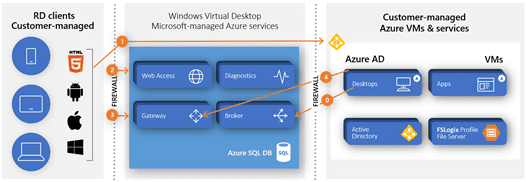
AVD hosts can be Windows 10 Enterprise, Windows 7 Enterprise, Windows Server 2012R2, 2016, or 2019. However, a major benefit of AVD is the availability of the Windows 10 Enterprise Multi-Session Operating System.
This OS support allows for multiple users to log into a single Windows 10 VM. The multi-session capability promotes significant cost savings compared to other VDI solutions. In standard VDI solutions, single users are assigned a dedicated virtual machine. Whereas when using Windows 10 multi-session with AVD, multiple users are assigned to a pool of desktops, thus sharing resources (and costs).
AVD deployments are always based on some form of VM image, whether it is a standard Azure marketplace image or a “golden image” created by an IT Team to cater to company needs.
When it comes to “golden images” there is a lot of administrative effort and many moving parts that go into creation, maintenance, and distribution of these images while keeping track of all changes; it can be a hectic and time-consuming task for businesses of any size.
This is where Microsoft Azure Shared Image Gallery and Azure DevOps come into play to provide an automated and uncomplicated way to build, maintain, support, and replicate these “golden images.” The shared image gallery helps overcome several obstacles, involved with management and distribution of images across the globe, while offering version management in one place. Some of the benefits include:
Whereas Azure Image Builder via Azure DevOps solves the problem of creating golden images in an automated and repeatable way, some of the benefits of Azure Image builder include:
In order to effectively use pooled Windows 10 multi-session desktops, shared storage for user profiles is a necessity. A user could be accessing a different VM every time they log in to AVD, so their user profile needs to be available and responsive.
FSLogix in combination with Azure File Storage solves this challenge efficiently. The desired Azure Storage SKU and data redundancy options can be configured to meet any availability requirements. Each user profile is stored on the file share and is mounted at user login to the AVD host. The user is not able to tell they are using a remote profile- it simply looks as if the profile is local to the machine. The profiles are managed using FSLogix which is simple to deploy and manage. FSLogix gets installed on the VM image and configuration settings are managed using group policy.
FSLogix with Azure File Storage makes for a great solution to manage user profiles without using roaming profiles or folder redirections. Plus, there are no synchronization conflicts because the profiles are always accessed directly from the remote location.
Additionally, the Azure File Storage share can be backed up using Azure Backup to an Azure Backup Recovery Services vault and easily replicated to other regions for added protection.
Azure Virtual Desktop offers five main benefits that make it a game-changer for modern businesses. First, it simplifies management, as it allows you to manage everything on the Azure portal. Second, it cuts costs through automated scaling that powers down unused machines. Third, it provides global reach with deployments across multiple regions. Fourth, Windows 10 Enterprise Multi-Session enables resource sharing between users. Finally, golden image management becomes effortless with Azure DevOps integration.
Managing virtual desktops has never been easier. With AVD, all your components become Azure Resource Manager resources, which means that you can manage everything directly in the Azure portal or with the help of PowerShell. You no longer have to worry about juggling separate RDS gateways, licensing, or load balancing, etc. Microsoft does all of that for you. User assignments, desktop pools, and Active Directory integration are all simplified and combined into one streamlined experience, freeing your IT team to work more strategic tasks.
Absolutely. AVD uses of automated scaling that powers virtual machines on and off depending on the number of user sessions and peak hours. When nobody’s logged in, those machines shut down, so you’re not paying for idle resources. Plus, Windows 10 Enterprise Multi-Session enables multiple users to share a pool of desktops instead of having multiple dedicated VMs for each user. This shared-resource approach dramatically reduces compute costs while maintaining excellent performance and user experience.
Windows 10 Enterprise Multi-Session is an operating system that is unique to Azure Virtual Desktop. Unlike traditional VDI where each user ends up with their own dedicated virtual machine, Multi-Session allows multiple users to share a pool of desktops at the same time. Think of it as accessing the Windows 10 OS that you’re already familiar with and sharing costs with other users. This means substantial savings in terms of compute resources and without sacrificing the desktop experience that your employees are used to.
Yes, AVD is built as a global service from the ground up. You can deploy virtual desktop hosts across multiple Azure regions around the world, ensuring your remote users always connect to servers in their geographic area. This regional proximity leads to a faster and smoother user experience with low latency rate. Whether your teams work out of Seattle, Singapore or Amsterdam, everyone sees consistent performance based on location.
Security is deeply embedded within the architecture of Azure Virtual Desktop. The platform uses strong encryption to protect data both in transit and at rest, ensuring sensitive business information remains secure at all times. Multi-factor authentication adds an additional layer of identity verification, helping prevent unauthorized access to corporate systems. Azure’s built-in threat detection and monitoring tools continuously analyze activity patterns to identify and respond to suspicious behavior. Administrators can centrally enforce security policies through Microsoft Intune or Group Policy, while Azure Firewall provides network protection by filtering outbound traffic. For organizations operating in regulated industries, Azure Virtual Desktop also supports compliance initiatives by keeping data within Microsoft’s highly secure cloud infrastructure.
Yes, Managed Azure Services fully support the ongoing management and optimization of Azure Virtual Desktop environments. At Intwo, we design, deploy, and manage your entire AVD infrastructure so your organization can focus on its core business priorities. Our managed services cover every stage of the lifecycle, including automated scaling configuration, secure user profile management, daily backups, and continuous security monitoring. We also provide ongoing maintenance, performance optimization, and proactive issue resolution. From host pool management to troubleshooting user access issues, our team handles the operational complexity while ensuring your virtual desktop platform remains secure, efficient, and cost-optimized around the clock.
Yes, Intwo has extensive experience helping organizations migrate from traditional on-premises virtual desktop solutions such as Remote Desktop Services (RDS) or Citrix to Azure Virtual Desktop. Our migration strategy is designed to minimize operational disruption while modernizing your infrastructure. Azure Virtual Desktop offers a flexible, cloud-native platform that is typically faster to deploy and significantly easier to manage than legacy systems. We begin by assessing your existing environment and identifying the most efficient migration path. From planning and architecture design to testing and final deployment, our team carefully manages each phase of the transition to ensure your employees remain productive while your organization moves to a more scalable and future-ready desktop platform.
The cost of implementing Azure Virtual Desktop varies depending on several factors, including the number of users, performance requirements, licensing structure, and infrastructure configuration. Because every organization’s environment is different, Intwo does not rely on generic pricing packages. Instead, we work closely with you to understand your technical needs, usage patterns, and business goals before preparing a tailored cost estimate. Our architects design environments that balance performance, scalability, and budget considerations. By implementing automated scaling and resource optimization strategies, we ensure you only pay for the computing resources you actually use. Contact our team for a detailed consultation and a customized pricing proposal.
Azure Virtual Desktop is designed to be accessible from almost any modern device, giving employees the flexibility to work from anywhere. Users can connect through traditional PCs, Mac computers, tablets, smartphones, or even directly through a web browser without requiring specialized hardware. Microsoft provides Remote Desktop clients for Windows, macOS, Android, and iOS, making it easy for teams to access their virtual workspaces from familiar devices. In most cases, the only requirement is a stable internet connection with approximately 100 kbps bandwidth (minimum), although higher bandwidth improves performance for video calls and graphics-intensive applications. This device flexibility enables organizations to support secure, productive work from virtually any location.

Rest assured. We've got you.
Let's get in touch and tackle your business challenges together.